To display the Discord Login button on your Shopify Store, please follow the below-mentioned instructions:
1. Go to Online Store > Themes > Customize.
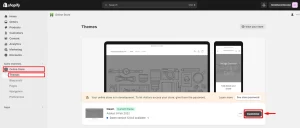
2. Select App Embeds and make sure the mO Discord Login Widget is Enabled.
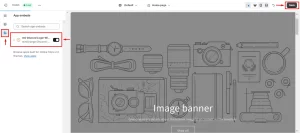
3. Click on Save.
61 views 0
To display the Discord Login button on your Shopify Store, please follow the below-mentioned instructions:
1. Go to Online Store > Themes > Customize.
2. Select App Embeds and make sure the mO Discord Login Widget is Enabled.
3. Click on Save.